Facility Management
Digital Simplicity for Smarter Fields

Digitسهل , your gateway to digital simplicity, where a quick scan completes complex tasks through pictorial selection and intelligence that shows the right tasks at the right time.
Digitسهل Dashboard
Your Operations Pulse at a Glance

Digitسهل Dashboard delivers a powerful overview of facility operations — combining real-time data, visual insights, and full traceability in a responsive interface for mobile, tablet, and desktop use.
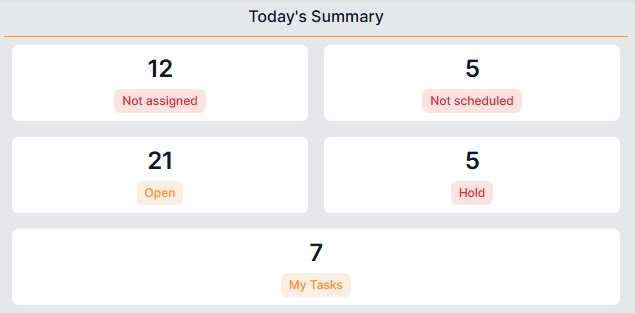
Today's Summary
Quick snapshot of today's not assigned, open, on-hold & unscheduled tasks — helping teams stay focused and maintain momentum.
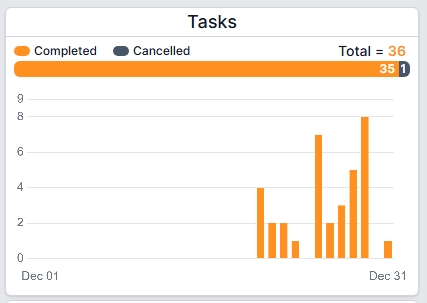
Monthly Task Overview
Interactive charts display daily task activity across the month — hover to view exact counts and quickly identify performance trends.
Monthly Surveys
Consolidated view of all client surveys submitted during the month — giving instant insight into service quality and feedback trends.
Recurring Tasks Tracking
Monitor completed and missed recurring tasks in common areas, such as public toilet cleaning — ensuring consistency and compliance.
Inventory Status
Real-time view of inventory item availability with full in-and-out traceability, enabling accurate control and accountability.




Facility Care Strategy
"On-ground technician focus"
From routine cleaning to critical equipment maintenance, every action matters — whether it's general housekeeping, preventive servicing, inspections, or emergency repairs. Each activity plays a vital role in maintaining safety, efficiency, and long-term asset performance across your facility lifecycle.
You can choose from three Smart Strategy modes:
-
Scheduled Approach:
Predefined tasks and timelines that automate routine cleaning, inspections, and preventive maintenance.
-
Manual Approach:
On-demand task execution, giving teams full control to respond instantly to issues as they arise.
-
Hybrid Mode:
A balanced mix of scheduled and manual operations — combining structure with operational flexibility.
Scheduled


Define your activity schedule: No more calendars or whiteboards. Just set it once, Digitسهل will handle the rest by showing tasks when due, tracking completions, and flagging anything missed.
Simple, smart, and stress-free.
Manual


Record operations in real time: With a quick scan, a simple selection, and a single click. Digitسهل can capture the moment with a photo and keep your records.
Accurate, visual, & up to date
Hybrid Mode
Enable both scheduled and manual modes together for the full flexibility of Digitسهل.
Request Submission (Customers)
Scan. Select. Go. — powered by unit-based intelligence
Every unit equipped with a Digitسهل QR code can be scanned by customers and occupants. They follow simple, pictorial steps — filtered automatically by:
unit → area → issue type
to ensure fast and accurate reporting. Capture a photo, submit the request, and you're done.
Core Process
- Scan the unit's QR code or select it from the list.
- Select Area: Users see only actual areas within their unit — not generic options — based on the real unit layout.
- Select Category: Categories are intelligently filtered based on the selected unit and area.
- Add Issue: With a single click, users select the relevant issue from a smartly filtered list. A photo can be added instantly to support faster resolution.
Smart Integration
Digitسهل understands your unit type and unit layout, ensuring that customers see only valid and relevant options when interacting with the system.
Site Inventory
Know Your Stock at Each Site
Digitسهل tracks every item and every kilogram — in real time. Inventory is managed at the site level, giving you instant access to accurate stock data whenever you need it. The Inventory Module manages all types of inventory activities, including usage, waste, and dispatches.
Core Process
- Access Inventory: From the home page, click on Inventory.
- View Summary: Instantly see your current inventory across all items.
Smart Integration
- Drill-down transparency: On Digitسهل Inventory Board, users can drill down into individual transactions, including their source and destination — giving full transparency and traceability.
- Responsive anywhere: It's a true responsive board — ensures your inventory is accessible and fully functional whether you're on a mobile, tablet, or desktop.
Smart Tips
- Check your inventory regularly to stay ahead of demand, plan operations, and reduce waste.
- Use the drill-down feature to analyze movement and performance across your facility operations.
Managed Units
Foundation Setup for Smart Operations
Units form the foundation of facility operations within Digitسهل. Managed by the Site Admin, they define the core structure on which all field activities, task execution, and data tracking are built.
Core Attributes
- Unit Type: Define the unit type so Digitسهل intelligently controls relevant operations — showing only what matters, without long task lists.
- Unit Area: Each unit includes defined sub-areas. Based on these area types, Digitسهل smartly manages applicable activities and workflows.
- Current Tasks: A consolidated view of task history along with all open and on-hold tasks — clearly showing what's completed and what requires action.
Smart Integration
Each manageable unit is assigned a Digitسهل QR code. This QR code becomes the gateway to all future interactions — allowing customers and staff to instantly report issues and manage tasks specific to that exact area with a simple scan.
Digitسهل Playbook
Your Complete Map to Smarter Operations