Equestrian
Ride into the Digital Future
All with a simple scan.

Welcome to Digitسهل, Equestrian, your digital gateway to smarter equestrian club management. From rider onboarding to horse care, ride tracking, and memberships— all streamlined through scan-and-click interaction, bilingual navigation, and real-time control across all devices.
Dashboard
Your Club's Pulse at a Glance

Digitسهل Dashboard gives you a powerful overview of your equestrian club's performance, combining real-time data, visual insights, and deep traceability. It's a true responsive board fully functional whether you're on a mobile, tablet, or desktop.
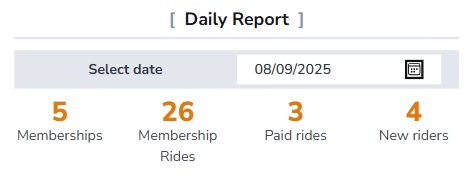
Daily Overview
View daily counts of new memberships, all rides, and new rider registrations—all in one place for quick operational awareness.
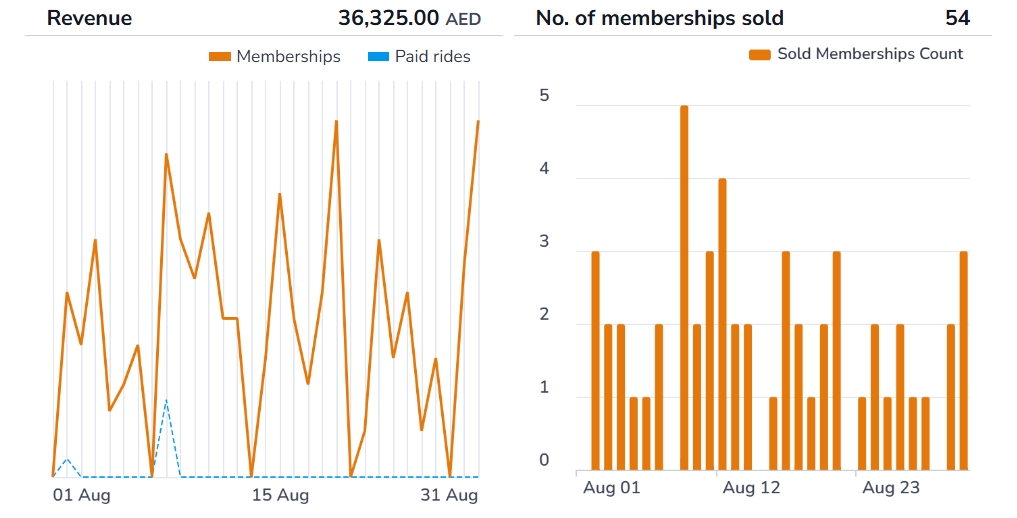
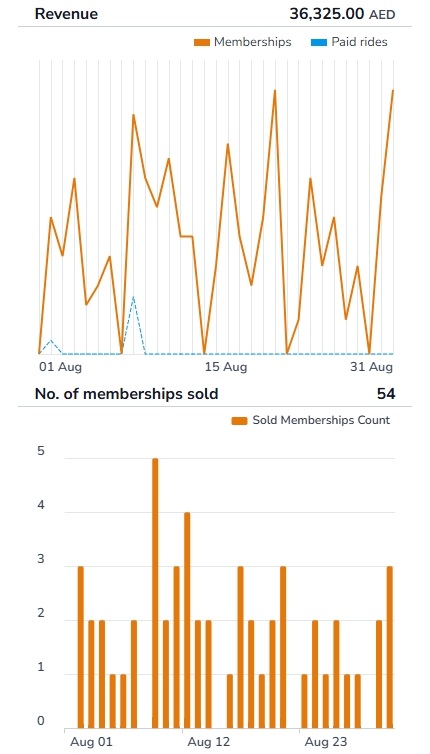
Monthly Sales
An interactive graph displays daily sales for memberships and rides, helping you track trends, peak periods, and overall revenue flow.
Monthly Memberships
Track daily membership sales throughout the month for a clear view of growth and engagement.
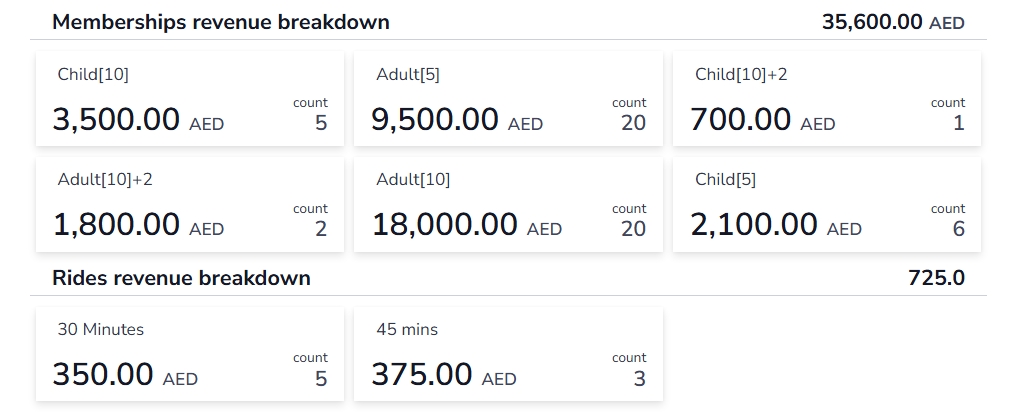
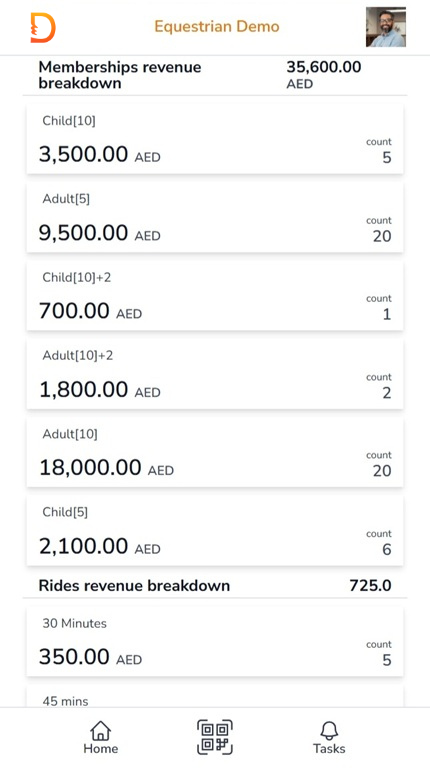
Revenue Breakdown
See a detailed breakdown of revenue by membership type, including total monthly sales and membership counts.
Monthly Ride Operations
Track rides conducted by each trainer and how many times each horse was ridden to keep scheduling optimized and horses balanced.

Liveboard
Track Every Ride in Real Time—Big Screen Ready, Mobile Friendly
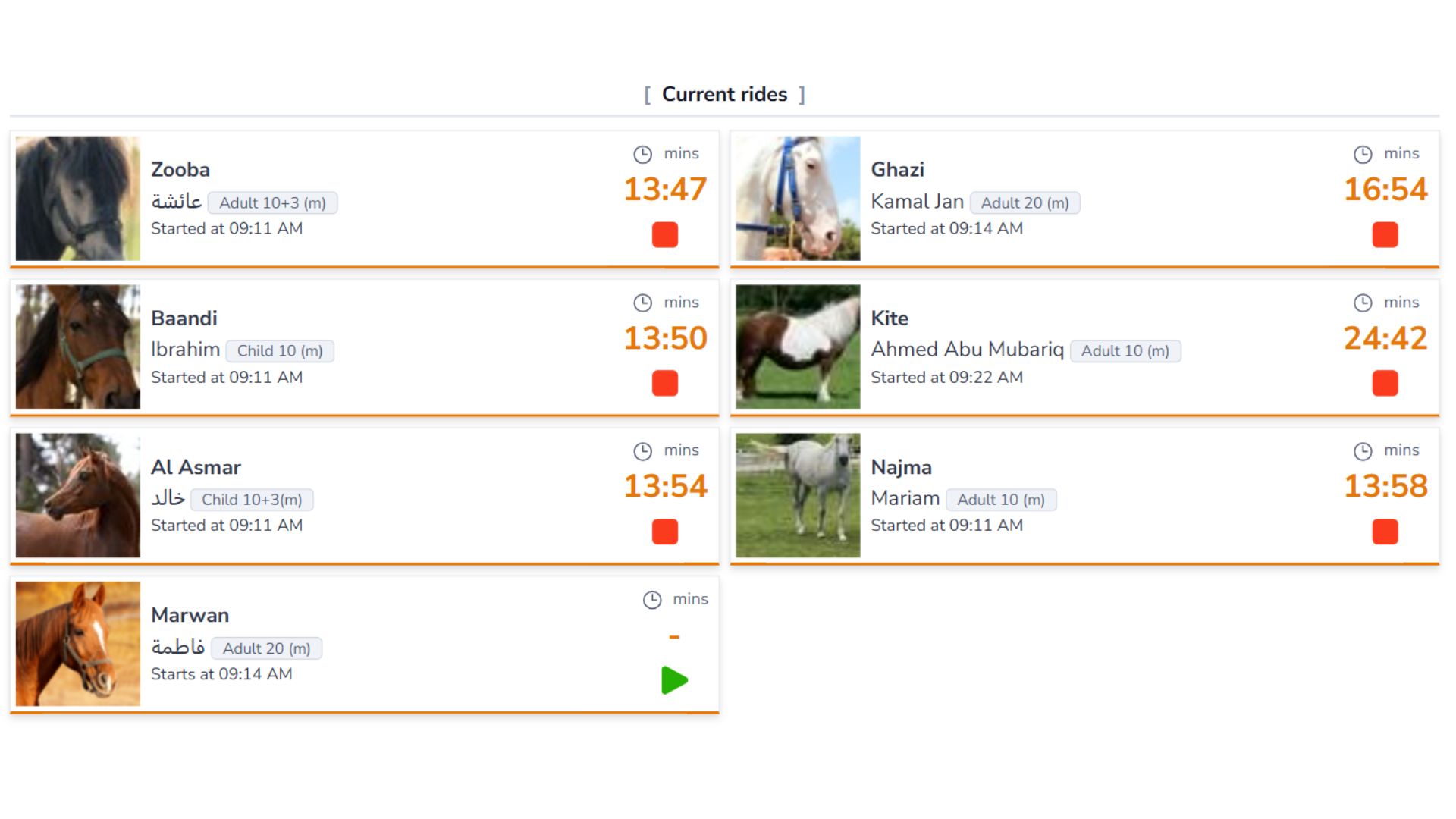
Experience the thrill of live ride tracking with Digitسهل Liveboard—your real-time window into every active ride. Whether displayed on a big screen in the arena or accessed from a mobile device, Liveboard keeps you updated with precision and style. See every ride in progress with a live countdown timer, showing exactly how much time remains, who's riding, and which horse is in use.
Big Screen or Mobile
Fully compatible—display live tracking on any device, from arena displays to phones in your pocket.
Rider & Horse in Focus
Instantly see the rider, horse, and remaining ride time at a glance.
Upcoming Rides & Quick Start
View upcoming rides on the same screen with the ability to start them instantly.
Digital Rider Registration
Self Online Rider Onboarding—No Paper, No Hassle
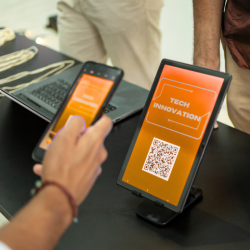
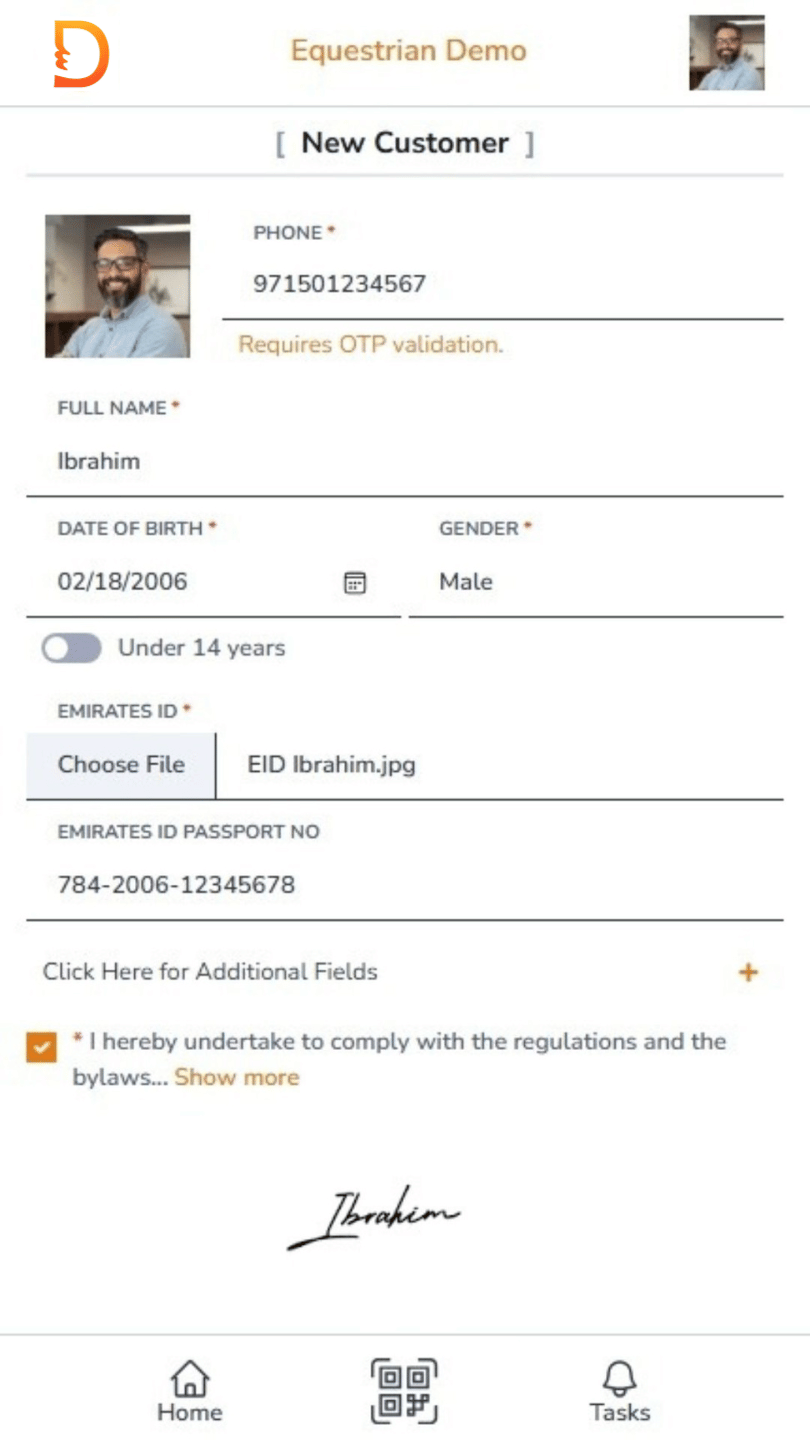
Welcome to the future of equestrian club onboarding. With Digitسهل , riders register themselves in just a few taps. They simply scan a QR code using their phone, enter their details, attach required documents, and sign digitally—all without paperwork or staff intervention.
OTP Verification via SMS
Riders verify their mobile number through a one-time password (OTP) sent via SMS—ensuring secure and authentic registration.
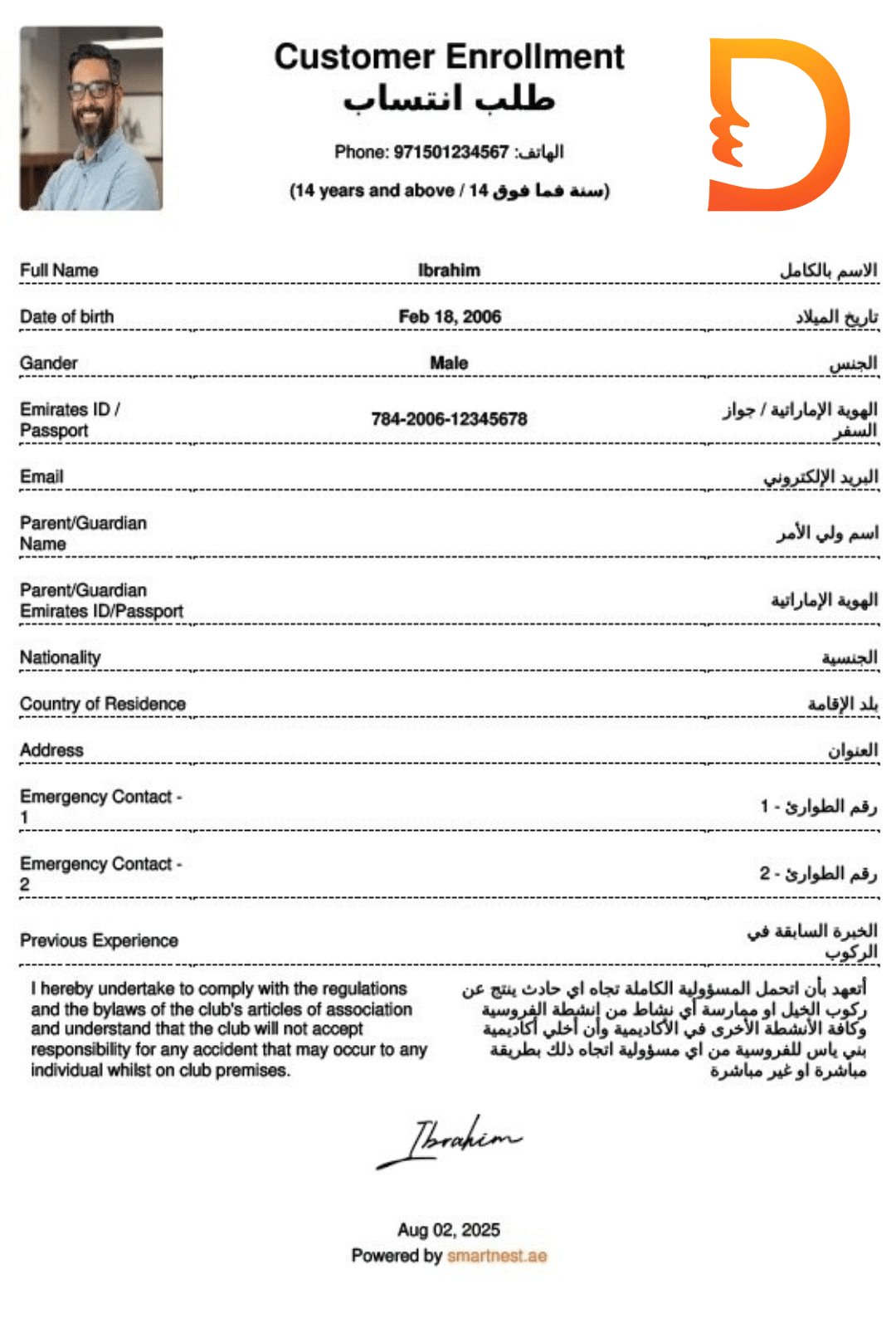
Instant PDF Generation
A signed registration form is automatically generated as a PDF and emailed to the rider, ensuring documentation is complete, professional, and accessible.
Seamless System Integration
Once submitted, the rider is instantly registered, ready to book rides, manage memberships, and access all club features without delay.
QR Code & Membership Card
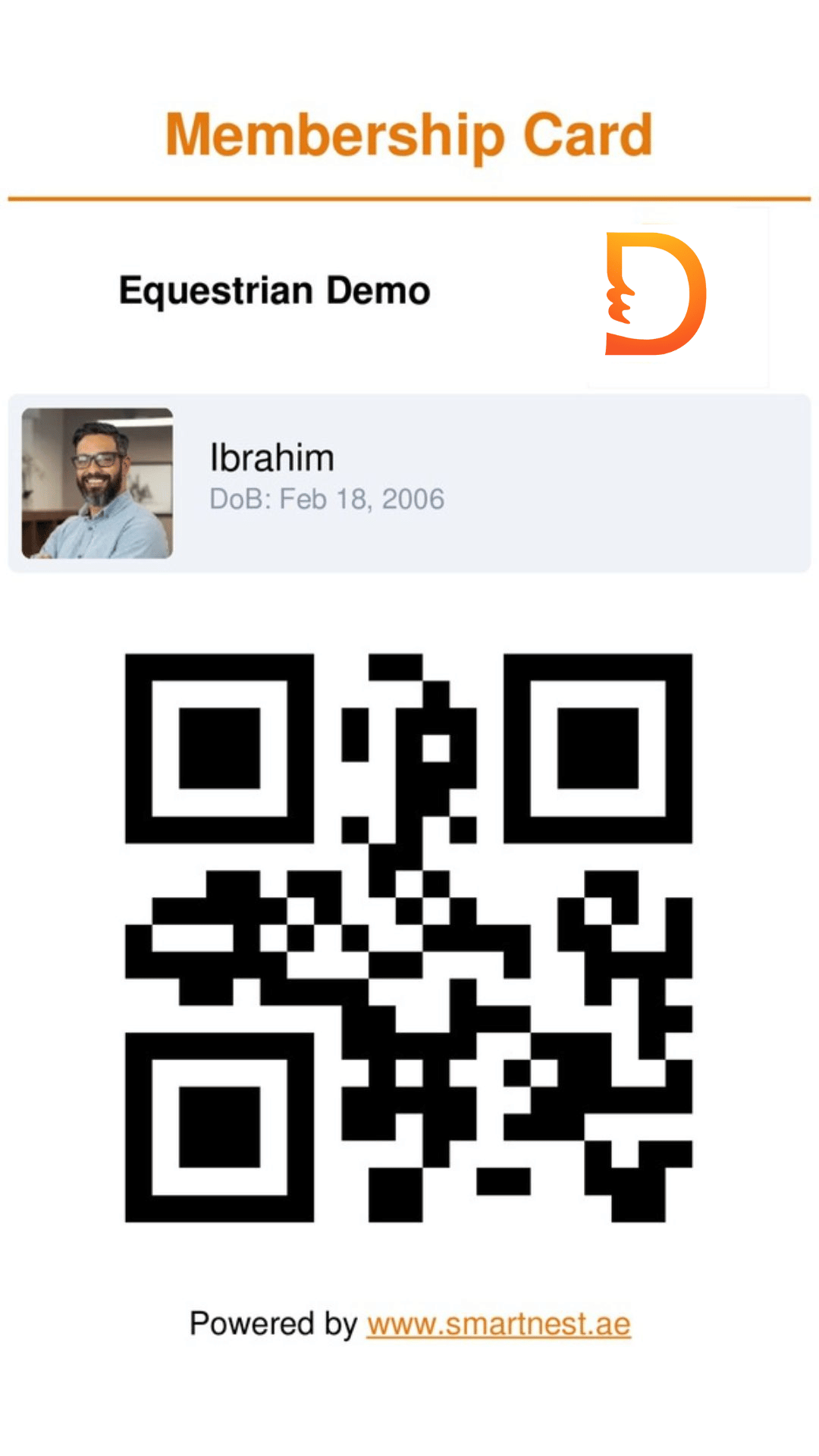
A unique QR code and digital membership card are auto-generated—becoming the rider's identity for scanning and managing all club activities.
Tasks Center
Prioritize What Matters—At a Glance

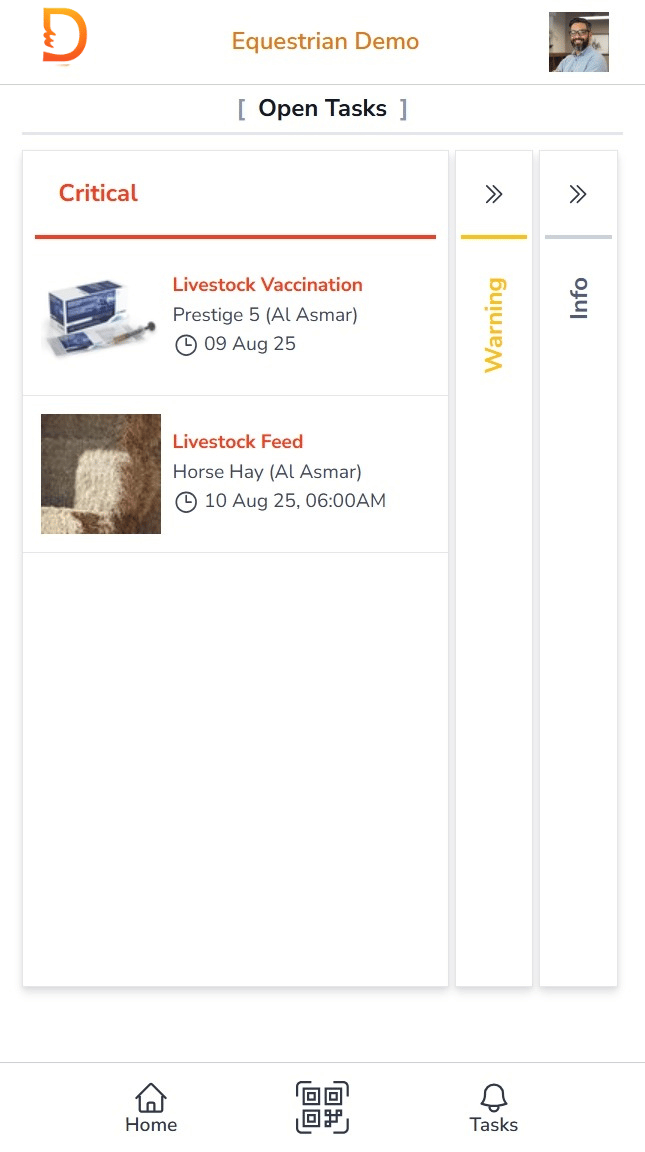
Stay on top of your club's operations with Digitسهل 's Task Center, where every open task is clearly categorized and instantly actionable. Whether it's a critical issue, a warning, or an informational reminder—everything is organized, visual, and just a tap away.
Three-Level Task Categorization
Tasks are automatically grouped into Critical, Warning, and Info categories—helping you focus on what needs attention first.
Clickable Task Cards
Each task appears as a visual card with a description, rider or horse name, and date. Tap to open and resolve instantly.
Live Task Counts
Real-time counters show how many tasks are pending in each category—keeping your team alert and responsive.
Example Use Cases
Critical
- Started rides but never ended
- Unapproved rider registrations
- Riders with no QR codes
Warning
- Scheduled rides not started
- Remaining number of QR codes
- Memberships expiring in 7 days
Info
- Remaining number of QR codes
- Expired memberships
- Friendly reminders for upcoming renewals
Memberships Setup
Define Flexible Plans—Sell with Simplicity

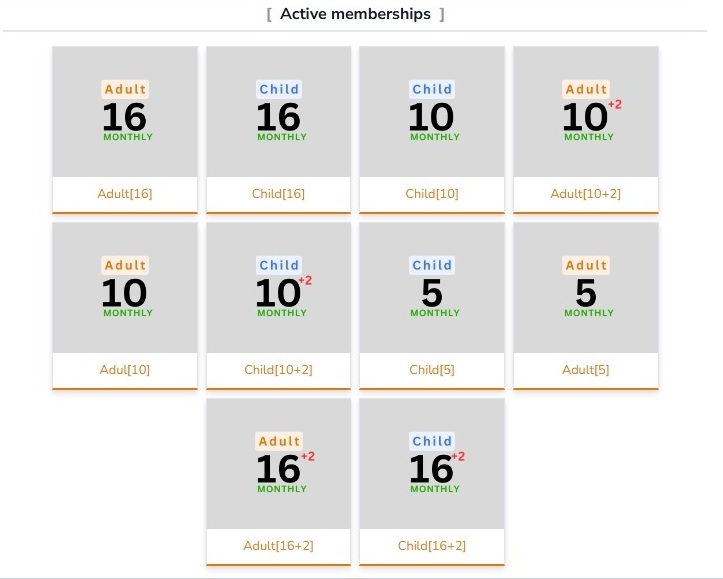
Digitسهل empowers your club to create and manage as many membership types as needed—each tailored to your operational model and customer preferences. Define them once and sell directly to riders through the app.
Unlimited Membership Types
Create multiple membership plans to suit different rider needs—daily, weekly, monthly, quarterly, bi-annual, or annual.
Ride Limits & Weekly Restrictions
Set total ride allowances with optional weekly limits so capacity stays balanced across the club.
Flexible Ride Timing
Define custom ride durations for each membership type—from quick sessions to extended training blocks.
Pricing & Visual Support
Set pricing and optionally attach a cover image so staff can identify the right plan at a glance.
Membership Duration & Auto-Expiry
Choose a duration—weekly through annual—and Digitسهل will handle automated expirations for you.
Dynamic Horse Card
Track Every Horse—Live, Scheduled, and Historical

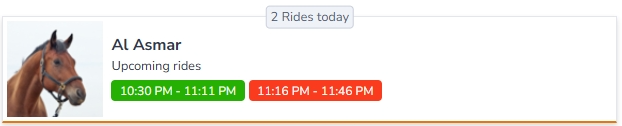
Digitسهل introduces a dynamic Horse Card system that gives you a complete, real-time view of each horse's activity. Whether a horse is in motion, queued for a ride, or resting, the card adapts to show exactly what matters now.
Live Ride Tracking
If the horse is currently in a ride, the card displays the rider, end time, and a live countdown timer for instant awareness.
Booking-Time Insights
When booking, the card shows rides completed today plus the next available slot so staff avoid overworking a horse.
Daily Summary View
See total rides completed and what's upcoming for the day—giving a quick snapshot of each horse's workload.
Rider Profile
One Scan. Full Story. Total Control.

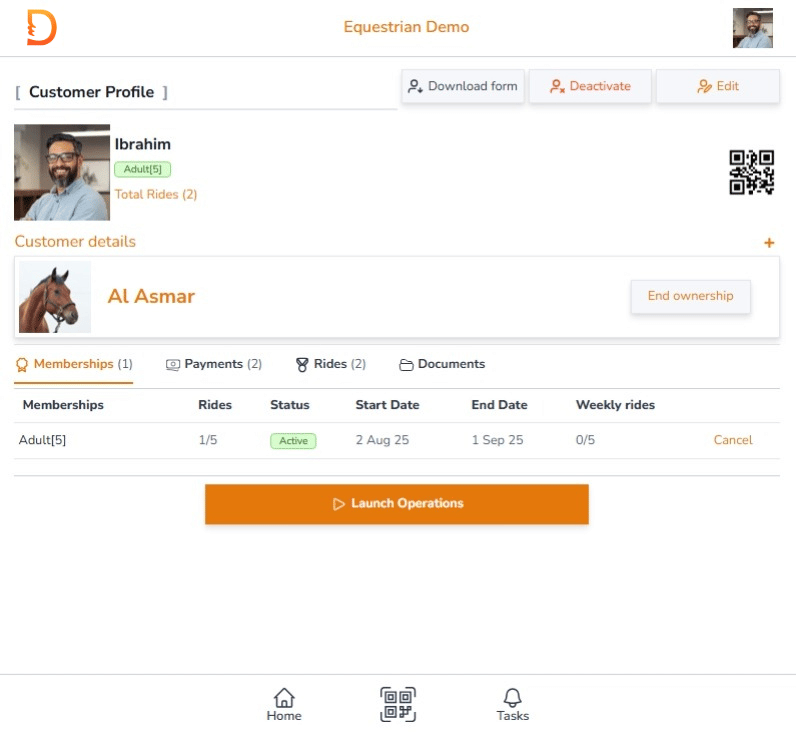
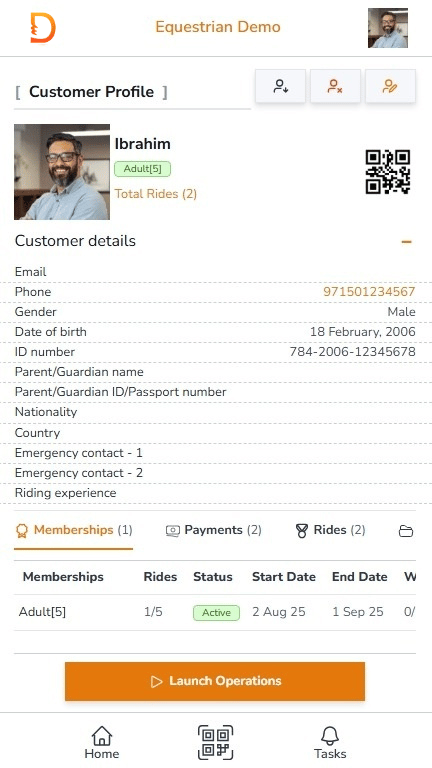
Digitسهل's Rider Profile turns each QR scan into a complete cockpit of information. Instantly access rider details, actions, payments, and history—all beautifully organized and fully interactive.
Instant Access via QR Scan
Simply scan the rider's QR code to open their profile—no search, no delay.
Complete Rider Overview
View profile photo, status, and total rides at a glance—the QR code stays visible for quick re-access.
Memberships & Balance
See all active and expired memberships with durations, start/end dates, and remaining ride balance.
Ride History & Schedule
Track every ride—past, present, and upcoming. Each entry includes date, time, and status for full visibility.
Payments & Receipts
Access payment history with receipt numbers, methods, and amounts for easy reconciliation.
Documents & Experience
Store and view rider documents with issue dates and track experience levels for better coaching and horse assignment.
Digitسهل Features
Your Complete Map to Smarter Equestrian Operations
Operations & Management
Online Registration Form
Start the Journey with a Tap
Digitسهل simplifies rider onboarding with a fully digital registration experience. Riders fill your club's online form, attach required documents, sign using their mobile touchscreen, and submit—without paperwork.
Core Process
- Scan QR Code: Rider scans the club's registration QR code using their mobile device.
- Enter Details: Rider fills in personal information including name, contact, date of birth, and experience level.
- Attach Documents: Upload ID, passport, or any required documents.
- Digital Signature: Rider signs directly on their mobile screen using touch input.
- Submit Form: Once complete, the form is submitted for verification.
- OTP Verification: Rider receives an OTP via SMS to verify their phone number.
Smart Integration
- Digitسهل automatically generates a signed PDF of the registration form and emails it to the rider.
- The rider is instantly added to the system with a unique QR code and digital membership card.
Smart Tips
- Ensure riders use a valid mobile number to receive OTP verification.
- Encourage riders to upload clear, legible documents for faster approval.
Approve Customer
One Click to Welcome a New Rider
After a rider submits their registration, Digitسهل gathers the application in Pending status so your team can double-check the details before granting access.
Core Process
- Open the Equestrian module and filter to Pending riders.
- Review identity information, submitted documents, and the digital signature.
- Confirm contact fields and any mandatory waivers.
- Select Approve to activate the rider profile instantly.
Smart Integration
- Only users with approval permission see the Approve action.
- Approval timestamps log automatically for compliance and audit trails.
- Approved riders gain immediate access to booking, memberships, and Liveboard.
Smart Tips
- Verify uploaded documents before approval to stay compliant.
- Use approval notes to flag follow-up requirements for coaches.
- Return riders to Pending if additional checks are needed.
Rider Membership Card
Auto-Generated Identity. Always Current.
Digitسهل issues a personalized membership card the moment a rider is approved. The card includes their photo, key details, and a unique QR code that powers every interaction across the platform.
Core Process
- Approve the rider to trigger automatic card creation.
- Profile changes update the card instantly—no manual edits required.
- Access the digital card from the rider profile for scanning across operations.
Smart Integration
- The QR code acts as the rider's digital identity for rides, memberships, and history lookup.
- Cards export as shareable images, perfect for WhatsApp, email, or wallet storage.
- Brand styling comes from your club theme—no design or print work needed.
Smart Tips
- Encourage riders to save or screenshot their card for quick access.
- Use the QR code to jump straight into the rider's 360° profile.
- Keep profile photos current so staff and trainers can identify riders easily.
Book Ride — Membership
Schedule a Ride in Seconds
Digitسهل streamlines booking for members by auto-detecting active plans, surfacing horse availability, and guiding staff through timing and trainer selections in a few taps.
The booking desk can see each horse's next available slot and rides completed today, helping balance workloads and protect horse wellbeing.
Core Process
- Scan Rider QR Code: Instantly open the rider profile and operations panel.
- Select Book Ride: Launches the booking wizard with membership-aware options.
- Choose Membership: Active plans surface automatically, with prompts if none are available.
- Select Horse: View availability status, rides today, and the next free time slot.
- Set Booking Details: Configure start time, trainer, and Auto Operation preferences.
- Submit Booking: Publish the ride to Liveboard and the rider profile in real time.
Smart Integration
- Digitسهل filters memberships by status and eligibility.
- Horse availability refreshes live, including ride counts and cooldown windows.
- Auto Operation can start and end rides automatically; manual control remains via Liveboard.
Smart Tips
- Use Auto Operation for fixed-time training sessions that need precise start/stop.
- Scan horse availability before confirming to prevent overbooking.
- Guest rides follow the same flow—switch to Guest Ride when needed.
Book Ride — Guest
Flexible Guest Booking with Smart Pricing & Control
Digitسهل keeps guest ride booking as smooth as member rides while preserving full control over pricing, duration, and discounts. Staff see guest ride types configured by admin alongside live horse availability.
Core Process
- Scan the guest rider's QR code or open their profile from the queue.
- Select Guest Ride to launch the dedicated booking wizard.
- Pick the guest ride type and duration defined by your club admin.
- Choose the horse with visibility into today's rides and next availability.
- Set booking details such as start time, trainer, and Auto Operation mode.
- Review smart pricing with VAT and discounts before confirming.
Smart Integration
- Guest ride types and durations remain fully configurable by club administrators.
- Pricing, VAT, and discounts calculate automatically—no manual math.
- Each booking logs with timestamps and links back to the rider profile.
Smart Tips
- Use tailored guest ride types for walk-ins, trial riders, or corporate events.
- Enable Auto Operation for fixed-duration guest sessions to keep timing precise.
- Keep discount settings up to date so billing stays accurate.
Sell Membership
Flexible Plans, Smart Pricing—Sold in Seconds
Digitسهل lets your team sell memberships directly from the rider profile. Intelligent plan detection, real-time pricing, and admin-controlled discounts keep every sale fast, accurate, and traceable.
Core Process
- Scan the rider's membership card to open their profile.
- Select Sell Membership to review available plans.
- Check existing memberships and add as needed.
- Choose the membership type with duration, ride counts, and ride length.
- Configure sale details including start date, discounts, VAT, and total amount.
- Submit the sale to activate the membership instantly.
Smart Integration
- Membership definitions, ride limits, and durations stay under admin control.
- Available discounts appear only when active for the selected plan.
- VAT calculations apply automatically for compliant billing.
- Booking priority respects overlapping memberships without manual intervention.
Smart Tips
- Use the Subscribed tag to avoid selling duplicate memberships.
- Double-check start dates so memberships align with rider commitments.
- Offer longer plans for better value and fewer renewals.
Add Document to Profile
Update Rider Records Anytime—Quick and Secure
Initial registration captures essential documents, but Digitسهل lets you upload new or replacement files at any time so profiles stay current and compliant.
Core Process
- Scan the rider's membership card to access their profile.
- Select Add Document from the operations menu.
- Choose the document type, upload the file, and submit.
Smart Integration
- Documents store securely and stay linked to the rider profile for quick retrieval.
- Document types are standardized by your club admin for consistent record keeping.
Smart Tips
- Update expired IDs, add new certifications, or attach missing waivers as needed.
- Check upload clarity so approvals remain swift and uninterrupted.
Update Rider Level
Keep Experience Records Accurate and Up to Date
Digitسهل lets your team adjust rider experience levels at any time, ensuring training plans, horse assignments, and safety protocols stay aligned with skill.
Core Process
- Scan the rider's membership card to open the profile.
- Select Update Level from the operations menu.
- Choose the appropriate experience level and submit.
Smart Integration
- Experience levels are predefined by your admin team for consistent grading.
- Changes appear instantly on rider profiles and impact booking eligibility.
Smart Tips
- Update levels after assessments, instructor feedback, or onboarding reviews.
- Keep skill data current to match riders with appropriate horses and trainers.
Assign Owner
Link Riders to Their Horses—Digitally and Seamlessly
Digitسهل lets your club formally assign horse ownership to riders whose horses stable with you. Once linked, the rider profile displays owned horses with shortcuts into live horse data.
Core Process
- Scan the rider's membership card to access their profile.
- Select Assign Ownership from the operations menu.
- Choose the horse and define the ownership start date.
- Acknowledge the statement “All required documents have been collected.”
- Submit to link the horse to the rider under Owned Horses.
Smart Integration
- Ownership links update both rider and horse profiles immediately.
- Ownership can be ended at any time with full audit logging.
Smart Tips
- Verify ownership documents before linking to maintain accurate records.
- Leverage ownership data to give riders visibility into horse workload and care.
Cancel Ownership
End Horse Ownership—Secure and Verified
Authorized staff can end horse ownership directly from the rider profile, keeping records accurate when a horse is sold, transferred, or leaves the club.
Core Process
- Scan the rider's membership card to access their profile.
- Locate the owned horse and select Cancel Ownership.
- Acknowledge the statement “I confirm to end ownership as of now.”
- Submit to remove the link and update system status immediately.
Smart Integration
- Every cancellation is timestamped for full audit traceability.
- Only authorized roles can end ownership, protecting horse assignments.
- The horse remains in stable records but is no longer linked to the rider.
Smart Tips
- Confirm the request with both rider and admin before finalizing.
- Use cancellation notes to capture reasons such as sale, transfer, or relocation.
Cancel Membership
End Membership with Refund and Confirmation
Authorized staff can end an active membership from the rider profile while keeping financial records in sync and communicating clearly with riders.
Core Process
- Scan the rider's membership card to access their profile.
- Locate the active membership and choose Cancel.
- Enter any refund amount to reverse revenue according to policy.
- Acknowledge the statement “I confirm to cancel the membership.”
- Submit to mark the membership inactive and remove booking access.
Smart Integration
- Refund transactions log automatically against revenue reports.
- Permissions ensure only authorized staff can cancel memberships.
- Inactive memberships disappear from booking workflows immediately.
Smart Tips
- Confirm refund terms with the rider before finalizing.
- Capture cancellation reasons to spot trends in attrition.
Cancel Ride
Remove Booked Rides—Quick and Controlled
Digitسهل lets authorized staff cancel booked rides that have not yet started, keeping schedules flexible and records accurate.
Core Process
- Scan the rider's membership card to open their profile.
- Locate rides marked Booked and select Cancel.
- Confirm to remove the ride from Liveboard and the rider's upcoming schedule.
Smart Integration
- Only rides with Booked status are eligible for cancellation.
- Each cancellation logs with a timestamp for auditing.
- Freed slots become instantly available for rebooking.
Smart Tips
- Confirm with the rider before cancelling to avoid surprises.
- Use cancellation notes to track reasons such as weather, injury, or scheduling conflicts.