Digital Club Hub
Digital Simplicity for Smarter Clubs

Digitسهل , your gateway to digital simplicity, where a quick scan connects members, memberships, and sessions—making registration, attendance, and club operations fast, accurate, and fully digital.
Digitسهل Dashboard
Your Club's Performance at a Glance

Digitسهل Dashboard delivers a powerful overview of club activity—combining real-time sales, memberships, and session data with visual insights in a responsive interface for mobile, tablet, and desktop.
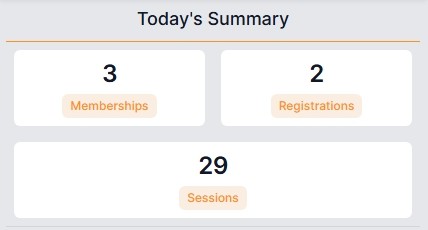
Today's Summary
Quick snapshot of memberships sold, new member registrations, and total sessions recorded today—keeping your team informed and operations moving.
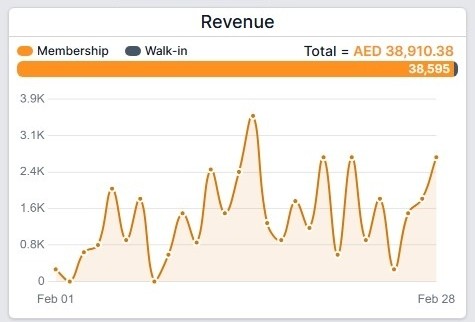
Monthly Revenue
Interactive charts display daily revenue across the month—hover to view exact amounts and quickly identify sales trends.
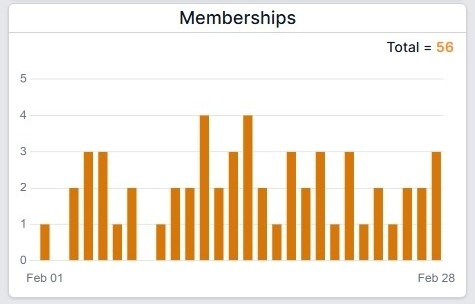
Monthly Memberships
Consolidated monthly view of memberships sold on a daily basis—providing clear insight into membership activation and growth trends.

Digitسهل Playbook
Your Complete Map to Smarter Operations
Self Registration
Join the Club in Minutes
Digitسهل enables secure self-registration directly from a visitor's own device to become a member. Visitors simply scan the club QR code, complete the online form, and sign digitally for a fully paperless onboarding experience. Digitسهل automatically generates a signed registration PDF and membership card and emails them to both the member and the club office.
Core Process
- Start Registration: Scan the club QR code to open the registration page.
- Complete Form: Enter personal details, upload a photo, and attach the identity card.
- Digital Signature: Accept the terms and sign directly on the screen.
- Submit: Digitسهل generates the signed registration PDF and sends it automatically.
Smart Integration
- Guardian Support: If the member is underage, Digitسهل automatically requests guardian information and consent.
- Digital Records: All signed documents are stored and accessible for both the club and the member.
- QR Activation: Once approved by the club, the member receives a unique QR code and digital membership card.
Smart Tips
- Place the registration QR code at the club entrance or reception to allow visitors to register instantly.
- Self-registration reduces front-desk workload while keeping all member records accurate and digitally signed.
Register Member (Club Device)
Register Members Instantly at the Club
Digitسهل enables fast member registration directly from the club's device with a fully digital, paperless process. Member details, identity documents, photos, and guardian information (for minors) can be captured instantly, and the member or guardian signs directly on the screen. Digitسهل automatically generates a signed registration PDF and membership card and emails them to both the member and the club office.
Core Process
- Open Registration: From the home screen, click New Registration.
- Enter Details: Add member information, photo, and attach the identity card.
- Guardian Details: For minors, Digitسهل automatically requests guardian information.
- Digital Signature: Member or guardian reviews the terms and signs directly on the screen.
- Submit: Digitسهل generates the signed registration PDF and membership card and emails them automatically.
Smart Integration
- Digital Records: All registration forms and documents are securely stored and accessible within the system.
- QR Identity: Each member receives a unique QR-based digital identity for future club activities.
- Instant Access: Members can immediately use their QR code for sessions, memberships, and club services.
Smart Tips
- Place tablets at the club reception to allow staff to register new members quickly and digitally.
- Using club devices ensures accurate data entry while providing a smooth onboarding experience for visitors.
Sell Membership
Activate Memberships in Seconds
Digitسهل enables fast and accurate membership sales through a fully digital process. Staff can quickly open the member profile by scanning the member's QR code or selecting the member from the list, then assign the required membership. Digitسهل automatically generates the sales receipt and records the membership, payment, and any applied discount—keeping all transactions accurately tracked in one place.
Core Process
- Open Member Profile: Scan the member QR code or search from the Members page.
- Select Membership: Choose the membership to assign to the member.
- Apply Payment: Add any discount and select the payment method.
- Create: Digitسهل records the membership, sales transaction, and payment instantly.
Smart Integration
- Automatic Receipts: Digitسهل generates a digital sales receipt for every membership sale.
- Unified Records: Membership activation, sales transactions, and payments are recorded in one place.
- Real-Time Tracking: Sales activity instantly appears on the club dashboard.
Smart Tips
- Use QR scanning to open member profiles instantly and speed up reception operations.
- Digital sales records help maintain accurate financial tracking and simplify reporting.
Book Session
Record Member Sessions Instantly
Digitسهل enables fast session booking with a simple QR scan. The system automatically checks active memberships and records the session while updating attendance and membership usage in real time.
Core Process
- Open Member Profile: Scan the member QR code to access the member page.
- Book Session: Click Book Session to start recording the session.
- Select Membership: Choose the correct membership if multiple are active.
- Confirm: Select the trainer if required and confirm the session.
Smart Integration
- Automatic Membership Check: Digitسهل verifies active memberships before recording the session.
- Attendance Tracking: Every session is automatically recorded in the member's session history.
- Usage Control: Membership session usage updates instantly after each booking.
Smart Tips
- Use QR scanning at the training area to record sessions instantly without searching for members.
- Real-time session recording ensures accurate attendance and membership usage tracking.
Edit Membership
Adjust Memberships with Full Control
Digitسهل allows controlled updates to member memberships while maintaining accurate records. Expiry dates can be extended or inactive memberships reactivated when sessions remain available, with all changes fully tracked in the system.
Core Process
- Open Member Profile: Scan the member QR code or search from the Members page.
- Select Membership: Choose the membership you want to edit from the member profile.
- Edit Details: Extend the expiry date or activate an inactive or expired membership if required.
- Save: Digitسهل updates the membership and records the changes instantly.
Smart Integration
- Controlled Editing: Changes are allowed only when sessions are still remaining.
- Automatic Updates: Membership records update instantly across the system.
- Full Traceability: All membership adjustments remain recorded in the member history.
Smart Tips
- Use membership editing to extend valid memberships when sessions remain unused.
- Digitally recorded updates ensure transparency and accurate membership tracking.
Approve Member
Activate Members with One Approval
Digitسهل simplifies reviewing and approving new member registrations. Once approved, the system automatically assigns a unique QR code and generates the member's digital registration card, which is emailed to both the member and the club office.
Core Process
- Open Members List: From the home screen, click Members.
- Review Registration: Select the pending member to review submitted details and documents.
- Approve or Reject: Confirm the registration or reject it if corrections are needed.
- Activate Member: Digitسهل assigns the QR code and generates the digital membership card automatically.
Smart Integration
- Instant QR Identity: Approved members receive a unique QR code for all club activities.
- Automatic Documents: Digital registration cards are generated and emailed automatically.
- Central Records: All member registrations remain securely stored within the system.
Smart Tips
- Review pending registrations regularly to activate new members quickly.
- Quick approvals help members start using their QR identity and club services immediately.
View & Edit Members
Manage Member Profiles with Ease
Digitسهل allows staff to quickly view and update member profiles from one central place. Member details can be accessed by searching the member list or scanning the member's QR code, ensuring fast and accurate profile management.
Core Process
- Open Members List: From the home screen, click Members.
- Find Member: Search the member list or scan the member QR code.
- Open Profile: Select the member to access the member home page.
- Edit Information: Open Member Information and click Edit to update details.
Smart Integration
- QR Access: Member profiles can be opened instantly by scanning the QR code.
- Central Profiles: All member details, documents, and activities are stored in one place.
- Instant Updates: Changes to member information are saved and reflected immediately.
Smart Tips
- Use QR scanning to open member profiles quickly during busy reception hours.
- Keep member information updated to ensure accurate communication and records.
Member Sessions Log
Track Every Session with Full Visibility
Digitسهل keeps a complete digital record of all member sessions. Staff can quickly access session activity by scanning the member's QR code and viewing the member's profile.
Core Process
- Open Member Profile: Scan the member QR code to access the member page.
- View Sessions: Click the Sessions tab to see the most recent sessions.
- View All: Open the full session history from the View All option.
- Filter Records: Use filters to refine sessions based on your requirements.
Smart Integration
- Complete History: Every session is automatically recorded and stored.
- Detailed Records: Each session shows trainer, membership usage, and timing details.
- Easy Navigation: Quickly switch between recent sessions and the full history.
Smart Tips
- Review session logs regularly to monitor attendance and member activity.
- Use filters to quickly locate sessions for reporting or performance tracking.
View Memberships
See Every Membership in One Place
Digitسهل maintains a complete digital history of all memberships used by each member. Staff can quickly access membership records by scanning the member's QR code and opening the member profile.
Core Process
- Open Member Profile: Scan the member QR code to access the member page.
- View Recent Memberships: The latest memberships appear on the member home page.
- View All: Click View All to open the complete membership history.
- Filter Records: Use filters to sort and refine memberships based on your requirements.
Smart Integration
- Complete History: Every membership assigned to the member is stored and traceable.
- Detailed Records: View membership type, activation date, sessions, and status.
- Quick Navigation: Easily switch between recent memberships and the full list.
Smart Tips
- Use membership history to quickly verify active and past memberships.
- Filtering options help locate specific memberships for review or reporting.
Edit Member Information
Keep Member Records Accurate
Digitسهل allows staff to update member information quickly while maintaining accurate and signed records. Profile details, photos, and member status can be updated, and when major changes occur the member can review and sign digitally to confirm the update.
Core Process
- Open Member Profile: Scan the member QR code or search from the Members page.
- Expand Information: Open Member Information on the member home page.
- Edit Details: Update profile information, photo, or deactivate the member if required.
- Submit: Save minor updates directly or request the member's digital signature for major changes.
Smart Integration
- Digital Updates: Updated membership cards are generated automatically after changes.
- Signed Records: When signed again, the updated registration PDF is shared with the member and the club.
- Accurate Profiles: All updates are instantly reflected in the system.
Smart Tips
- Ask members to review and sign when important details change to keep records validated.
- Regularly update member information to maintain accurate and reliable member profiles.
Create Membership Type
Design Flexible Membership Programs
Digitسهل allows clubs to create flexible membership types tailored to their activities and programs. Memberships can be configured with duration, number of sessions, session length, pricing, trainer requirements, and activity areas—giving clubs full control over how memberships are structured and offered.
Core Process
- Open Membership Types: From the home screen, click Membership Types.
- Add New: Click Add New to open the membership creation form.
- Configure Membership: Enter the membership name, activity, duration, sessions, and price.
- Create: Save the membership type to make it available for sale or assignment.
Smart Integration
- Flexible Structure: Configure memberships by duration, sessions, and session time.
- Activity Linking: Assign memberships to specific sports or activity areas.
- Ready to Sell: Newly created memberships become instantly available for sales and member assignments.
Smart Tips
- Create multiple membership types to support different training programs and pricing plans.
- Clear membership structures help staff sell memberships quickly and accurately.
View Membership Types
See Your Membership Structure Clearly
Digitسهل provides a clear view of all membership types configured for your club. Each membership type includes flexible settings such as duration, number of sessions, session time, pricing, and activity structure-helping clubs easily manage and review their membership programs.
Core Process
- Open Membership Types: From the home screen, click Membership Types.
- View List: See all membership types configured for the club.
- Open Details: Select any membership to view its full configuration.
- Review Structure: Check duration, sessions, pricing, and activity settings.
Smart Integration
- Flexible Configuration: Memberships support customizable duration, sessions, and session time.
- Activity Linking: Membership types can be linked to specific sports or activities.
- Central Control: All membership structures are managed and maintained in one place.
Smart Tips
- Review membership types regularly to ensure they match your club's programs and pricing.
- Clear membership structures help staff assign and sell memberships more efficiently.